.webp) Online
OnlineNot sure which channel fits your business?View all services →
Three inputs. Instant KPIs. No spreadsheets.Open a calculator →
OnlineGoogle reports that advertisers using Consent Mode can recover, on average, more than 70% of ad-click-to-conversion data that would otherwise be lost to privacy restrictions. In the current market, a flawed google ads conversion tracking setup doesn't just result in messy reports; it directly limits...

Google reports that advertisers using Consent Mode can recover, on average, more than 70% of ad-click-to-conversion data that would otherwise be lost to privacy restrictions. In the current market, a flawed google ads conversion tracking setup doesn't just result in messy reports; it directly limits your ability to scale. If your data signals are weak, Google's bidding algorithms are essentially flying blind, wasting your budget on low-value traffic while your competitors capture the high-intent conversions.
You likely feel the constant pressure of balancing precise measurement with increasingly strict UK and EU privacy regulations. It's a common strategic bottleneck where technical complexity meets legal necessity. We'll help you master these nuances to ensure every penny of your ad spend is tied to measurable growth and actual profit. This guide provides a definitive roadmap for the 2026 tracking environment. You'll learn how to implement the newly unified Enhanced Conversions, navigate mandatory Consent Mode requirements, and transition your offline data to the Data Manager API to maintain a 100% accurate feedback loop for your campaigns.
• Understand why high-integrity tracking is the critical foundation for feeding Google’s Smart Bidding algorithms and achieving a superior ROAS.
• Master the technical nuances of a professional google ads conversion tracking setup using Google Tag Manager to ensure 100% data accuracy.
• Learn to implement Enhanced Conversions and Consent Mode to recover up to 70% of lost data while maintaining full privacy compliance.
• Identify the specific steps to correctly categorize conversion actions to align your bidding strategy with actual business profit.
• Discover how to use Tag Assistant and status monitoring to proactively audit your tracking infrastructure and eliminate wasted ad spend.
Success in digital advertising isn't defined by how much you spend, but by how well you measure the return. Within the Google Ads platform, conversion tracking acts as the definitive bridge between marketing expenditure and tangible business revenue. It's the nervous system of your account. Without it, you aren't managing a strategy; you're participating in a high-stakes guessing game. A precise google ads conversion tracking setup is the only way to prove ROAS and justify every pound of your budget.
Modern advertising relies almost entirely on machine learning. Google’s Smart Bidding algorithms require high-volume, high-quality data signals to function. If your tracking is broken or incomplete, these algorithms will optimize for the wrong users, leading to inflated costs and diminished returns. Missing data creates a "flying blind" scenario. You might see high click-through rates, but if those clicks don't result in tracked actions, the system can't learn which audiences are actually profitable. Moving from vanity metrics like clicks to business outcomes like leads and sales is the first step in professional account maturity.
Effective tracking isn't just about the final sale. Macro conversions represent your primary goals. These are the completed purchases, inbound phone calls, or qualified lead forms that directly impact your bottom line. They're the metrics that pay the bills. However, micro conversions are equally vital for a healthy account. These include newsletter sign-ups, "Add to Cart" actions, or views of key pricing pages.
Tracking the full funnel provides the necessary context for Google’s AI. By capturing these smaller engagement steps, you give the system more data points to understand which users are likely to eventually convert. This holistic view prevents the algorithm from stalling when macro conversion volume is low. It allows for a more nuanced approach to audience building and retargeting strategies.
The industry has moved definitively away from "last-click" attribution models. In 2026, success depends on data-driven attribution that credits every touchpoint in a user's journey. Professional PPC management now focuses heavily on "value-based bidding." This is where we assign specific monetary weights to different actions based on their historical contribution to profit.
This shift allows the system to prioritize high-value customers over those who are just browsing. It's a move from quantity to quality. Clean, accurate tracking is the only way to unlock this level of strategic sophistication. If your data is flawed, your bidding will be flawed. Ensuring your google ads conversion tracking setup is robust is no longer a technical recommendation; it's a fundamental requirement for business growth.
Selecting the right technical framework for your google ads conversion tracking setup is a foundational decision that dictates your long-term data flexibility. Advertisers generally choose between three primary methods: Google Tag Manager (GTM), the direct Google Tag (gtag.js), or importing goals from Google Analytics 4 (GA4). While GA4 import is often marketed as the simplest route, it's rarely the most accurate. Data latency and discrepancies between platform attribution models can lead to a 10% to 15% underreporting of conversions compared to direct native tags. For professional accounts, the choice isn't just about installation ease; it's about minimizing the gap between a user action and the feedback signal sent to Google's bidding engine.
We recommend Google Tag Manager for 95% of professional setups. It functions as a centralized command center, allowing you to manage tracking for Meta, LinkedIn, and Google Ads without constantly editing your website's source code. This separation of concerns reduces the risk of site crashes and significantly speeds up deployment. The "Preview and Debug" mode is an essential feature, providing a sandbox environment to verify that tags fire only on the intended triggers before they go live.
Beyond simple tracking, GTM is the engine behind advanced conversion rate optimization strategies. It allows for the deployment of complex event listeners, such as scroll depth or video engagement, which provide the granular data necessary for behavioral analysis. If your goal is to scale beyond basic lead forms, GTM provides the technical infrastructure required for high-level growth. If you're unsure if your current container is optimized, a professional PPC audit can identify hidden data leaks.
The hard-coded Google Tag approach involves placing a JavaScript snippet directly into the header of every page on your site. This method is suitable for simple, single-page websites where the conversion goals are unlikely to change. It's a "set it and forget it" solution for businesses with minimal technical requirements. However, this simplicity comes with a heavy maintenance burden as you grow. Every new tracking requirement or platform update requires manual code changes, which increases the likelihood of human error.
In the 2026 landscape, this method is becoming outdated for complex e-commerce or multi-channel brands. Managing separate snippets for different platforms leads to "code bloat," which can negatively impact page load speeds and user experience. Unless you have a dedicated developer to manage every minor adjustment, the direct tag approach eventually becomes a strategic bottleneck that prevents agile campaign adjustments.
The decision to DIY or hire an agency depends on your technical depth. A basic setup is manageable for most, but implementing Consent Mode v2 or server-side tagging requires a specialized understanding of data architecture. If your ad spend exceeds five figures monthly, the cost of inaccurate data far outweighs the investment in professional implementation.
The 2026 Google Ads interface prioritizes goal-based workflows, moving away from the fragmented menus of previous years. To begin your google ads conversion tracking setup, navigate to the "Goals" tab and select "Summary" under the Conversions menu. When creating a new action, you must choose between Sales, Leads, or Website Traffic. This choice is not merely cosmetic. It informs the underlying algorithm about the specific type of user behavior you want to incentivize. Selecting "Sales" for a lead-gen form will confuse the machine learning engine, leading to inefficient bidding and higher costs per acquisition.
After selecting your category, you'll configure the "Count" and "Click-through conversion window" settings. For e-commerce sales, set the count to "Every" to capture multiple purchases from the same user. For lead generation, "One" is usually the correct choice to avoid inflating your results with duplicate form submissions from the same individual. A standard 30-day click-through window remains effective for most industries, though high-consideration B2B services may require a 90-day window to capture the full decision cycle. Once these settings are saved, Google will generate your Tag and Event Snippet, which are the technical keys to measurement.
Even lead-generation campaigns need a monetary value assigned to them. Without a value, you cannot utilize Value-Based Bidding or Return on Ad Spend (ROAS) targets. Calculate a proxy value by multiplying your lead-to-close rate by your average customer lifetime value. Data-driven attribution is the mandatory standard for 2026. It uses historical data to distribute credit across all touchpoints rather than just the last click. Finally, ensure your primary actions are set to "Include in Conversions" while secondary actions like "Newsletter Sign-ups" are kept as observation-only signals to avoid muddying your primary performance data.
The first step in GTM is creating a Google Ads User Linker tag. This tag is essential for cross-page tracking; it ensures that the click data persists as the user moves from your landing page to your conversion page. Without it, your attribution will fail. Next, create a Google Ads Conversion Tracking tag. You will need the Conversion ID and Conversion Label generated during the initial google ads conversion tracking setup process.
The final piece is the Trigger. For most businesses, a "Thank You" page view is the most reliable signal. If your site uses AJAX forms that don't redirect, you will need to set up a "Custom Event" trigger based on a successful form submission dataLayer event. This technical precision prevents false positives and ensures your data reflects actual business growth.
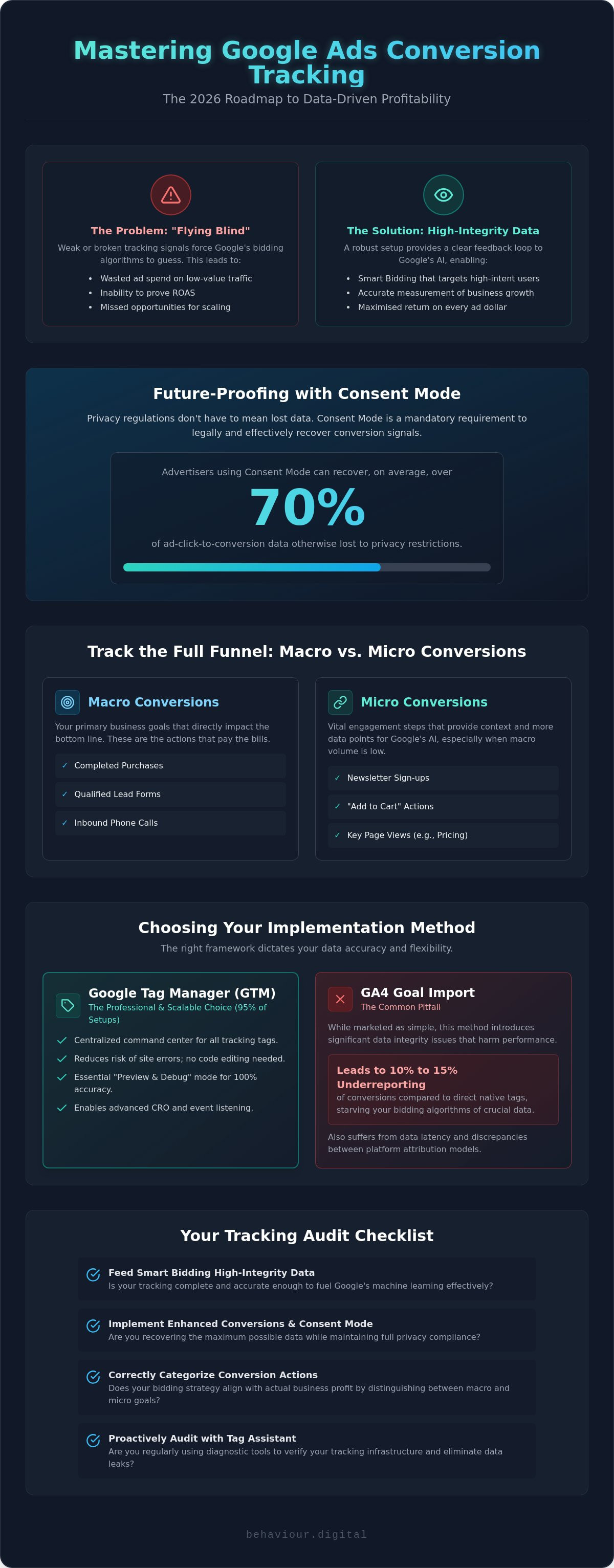
Privacy regulations and the industry-wide shift away from third-party cookies have fundamentally changed the measurement landscape. By June 15, 2026, Google Consent Mode became the exclusive mechanism for controlling data flow between analytics and advertising platforms. Relying on a legacy google ads conversion tracking setup without these features is a recipe for data degradation. Enhanced Conversions and Consent Mode v2 aren't optional upgrades; they're the technical requirements for maintaining a competitive edge in a privacy-first world.
Enhanced Conversions use hashed, first-party data, such as email addresses or phone numbers, to match users who convert after interacting with an ad. This process happens securely using the SHA-256 algorithm. As of June 2026, Google has merged Enhanced Conversions for web and leads into a single, unified feature. This simplification allows advertisers to feed more accurate signals back into the bidding engine, effectively bypassing the limitations of traditional cookie-based tracking. It ensures your "Smart Bidding" algorithms have the necessary volume to optimize for profit.
To implement this for lead generation, you must configure your data layer to capture user-provided information at the exact moment of form submission. This data is hashed on the client-side before it's sent to Google, ensuring user privacy while maintaining attribution accuracy. Once your GTM tags are configured to pull these variables, you can enable the unified feature within your Google Ads account settings. Enhanced Conversions can increase reported ROAS by up to 15% by recovering lost paths.
Since March 6, 2024, Consent Mode v2 has been mandatory for all advertisers targeting the UK and EEA. If you fail to implement this, Google Ads will stop receiving data for these regions entirely, effectively blinding your campaigns. Integration requires your cookie consent banner to communicate directly with GTM, passing "granted" or "denied" signals for analytics and advertising storage.
You must choose between "Basic" and "Advanced" implementation. Basic mode blocks tags until consent is given, while Advanced mode sends "cookieless pings" when consent is denied. These pings allow Google to provide "Modelled Conversions." On average, this modeling recovers more than 70% of ad-click-to-conversion data that is lost when users decline tracking. This level of accuracy is vital for maintaining stable campaign performance and scaling your budget with confidence. If you need a technical partner to secure your data infrastructure, contact Behaviour Digital for a comprehensive tracking audit.
A successful google ads conversion tracking setup requires ongoing maintenance to remain reliable. The digital environment is volatile. Browser updates, site code changes, and cookie banner adjustments can easily break your tracking infrastructure without warning. You must treat your data signals as a living system that requires regular health checks to ensure your bidding algorithms are never fed corrupted information. Verification is the difference between a high-performing account and a wasted budget.
Start with Google Tag Assistant. This tool allows you to simulate a user journey and see exactly which tags fire at each step. It is the most effective way to verify that your conversion triggers are only activating on the intended actions. Within the Google Ads interface, monitor the "Conversion Status" column closely. If a tag shows as "Unverified," it hasn't recorded a conversion recently. "Recording" confirms that the platform is receiving signals, but it doesn't guarantee those signals are accurate. You need to look deeper into the "Diagnostics" tab to identify potential latency or tagging errors.
Performing a monthly reconciliation is essential for long-term growth. Compare the conversion numbers in Google Ads against your CRM or Shopify backend. While a 5% to 10% discrepancy is common due to attribution models and privacy settings, anything higher suggests a technical leak. For brands demanding 100% data ownership, server-side tracking is the ultimate solution. Moving your tracking from the client-side browser to a server-side container eliminates reliance on third-party cookies and provides a cleaner, more resilient data stream that is harder for browsers to block.
Warnings like "Tag inactive" often stem from a change in your site's URL structure or a broken GTM trigger. Duplicate conversions are another frequent issue that inflates your perceived performance. If you see more conversions than actual sales, check your "Count" settings. Ensure sales are set to "Every" and leads are set to "One." Remember that conversion lag is a factor. In 2026, data-driven attribution can take up to 24 hours to fully settle in your reports, so avoid making drastic campaign changes based on the last few hours of data.
Once your tracking is stable and accurate, you can transition from Target CPA to Target ROAS bidding. This shift moves your focus from the cost of a lead to the actual profitability of a customer. It is a complex transition that requires a deep understanding of your margins and data architecture. Many high-growth brands choose to partner with a PPC agency in Glasgow to manage this technical complexity and ensure the data remains clean. The final step in account maturity is integrating offline conversion tracking via the Data Manager API. This allows you to upload lead status updates from your sales team, ensuring Google's AI optimizes for closed deals rather than just initial form fills.
A robust google ads conversion tracking setup is no longer a "set and forget" task; it is a continuous strategic requirement. By mastering the transition to server-side tagging and unified Enhanced Conversions, you move beyond mere reporting into the realm of value-based bidding. This technical precision ensures your budget is allocated to the users most likely to drive actual business profit rather than just hollow engagement metrics. Accuracy is the only sustainable way to scale in an increasingly restricted privacy environment.
If you're concerned about data leaks or the complexities of Consent Mode compliance, professional intervention can safeguard your growth. As specialists in PPC and CRO synergy, Behaviour Digital provides expert PPC management from our Glasgow headquarters. We focus on quantitative data and measurable business development, ensuring your tracking infrastructure is built for the requirements of 2026. Get a Professional Google Ads Audit from Behaviour Digital today to verify your signals and eliminate wasted spend. Your path to measurable success starts with a transparent, data-first strategy.
Yes, the Google Ads platform provides the conversion tracking infrastructure at no additional cost. While the software itself is free, the real investment lies in the technical configuration required to ensure data integrity. Most businesses find that the cost of inaccurate data far outweighs the initial expense of hiring a specialist to perform a professional google ads conversion tracking setup.
Native Google Ads tracking is superior for bidding optimization because it records conversions at the moment of the click. GA4 imports often suffer from a 24-hour latency and utilize different attribution logic, which frequently results in a 10% to 20% data discrepancy. For professional PPC management, we always recommend using the direct Google Ads tag via GTM to provide the cleanest signals to the bidding engine.
Most conversions appear in your reports within 3 to 24 hours. However, because Google uses data-driven attribution as the standard in 2026, it can take several days for the final credit to be distributed across all touchpoints in a complex user journey. It's a mistake to make immediate budget decisions based on the last 48 hours of data; you must allow the attribution window to settle.
You don't necessarily need a developer if you're using Google Tag Manager, as it allows you to deploy tags without editing the site's source code directly. However, for advanced features like server-side tracking or configuring custom data layer events for Enhanced Conversions, technical expertise is often required. A professional audit can determine if your current container is leaking valuable conversion data.
Failing to implement Enhanced Conversions results in a significant loss of data signals, particularly from users who opt out of third-party cookies. Your bidding algorithms will have less information to work with, which typically leads to higher costs per acquisition and lower ROAS. Enhanced Conversions are the primary tool for recovering up to 15% of "lost" conversion paths in the current privacy-first landscape.
Yes, you can track phone calls using Google’s dynamic number insertion (DNI). This system replaces your website's phone number with a Google forwarding number when a user arrives via an ad. It allows you to track call duration and caller area codes, providing a clear, quantifiable link between your ad spend and offline inquiries or sales team leads.
If your site lacks a dedicated "Thank You" page, you should use event-based triggers in GTM. You can track successful AJAX form submissions, button clicks, or specific engagement milestones like video views. This requires a more technical google ads conversion tracking setup, but it provides a more accurate reflection of user intent on modern, single-page applications where page reloads are rare.
Compliance depends entirely on your implementation of Consent Mode v2. To meet GDPR and UK privacy standards, your tracking must respect the user's choice to opt out of cookies. When correctly configured, Consent Mode allows Google to use modeled conversions to fill data gaps without violating privacy laws, maintaining both legal compliance and reporting accuracy for your EEA and UK traffic.

Luke leads strategy across every Behaviour Digital account — building data-driven advertising systems for ambitious brands. When he's not auditing ad accounts, he's writing about what he found in them.
Get a free, tailored growth plan — we'll run our framework on your accounts and show you exactly what we'd do.
Get your free growth plan →